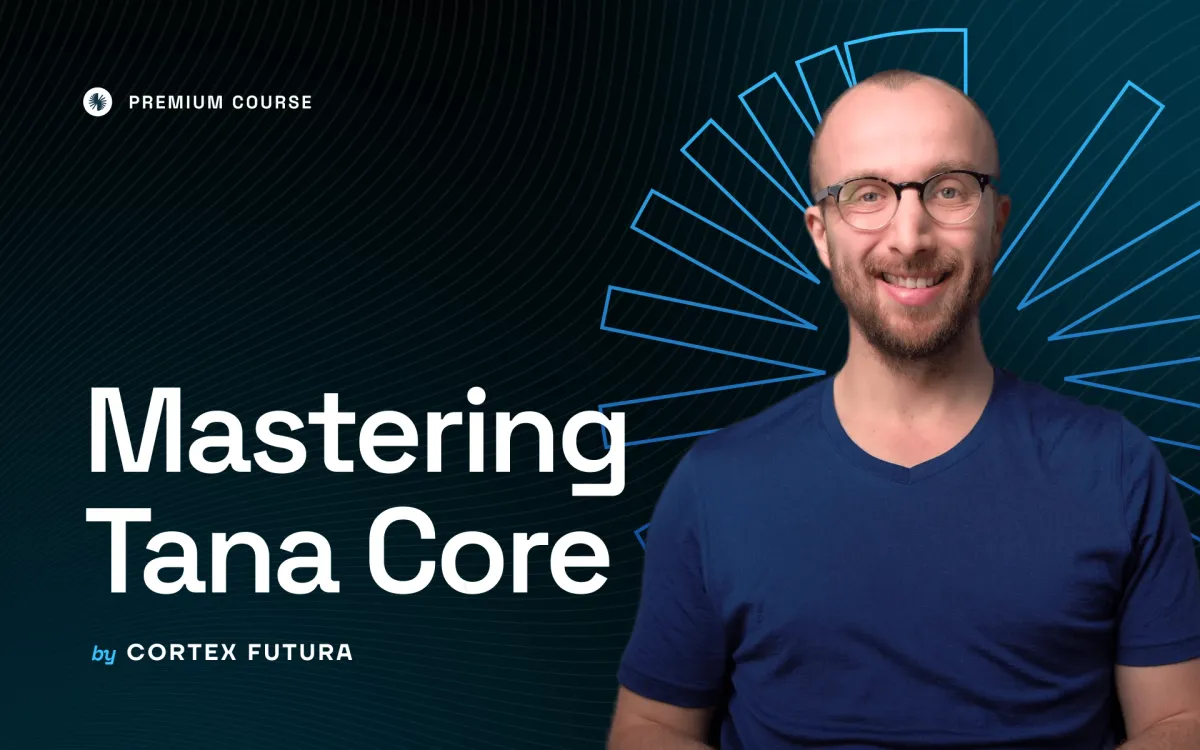
Course page
See the live course demo page ⬇️


In today’s busy online world, lots of people like learning on the internet to get new skills. That’s why having a special page for courses on your website is super important. This page helps show off your courses and gets more people interested in learning from you.
A special course page can make SEO better and help get more leads.
These steps will show you how to create a course page that includes videos from YouTube, Vimeo, or BunnyCDN.
Step 1: Create a course page
Create new blog/page (recommeneded page type) and use the Course template.
You need to choose Course template and assign specific tags to indicate your video sources:
| Platform | Tag |
|---|---|
| Youtube | #youtube |
| Vimeo | #vimeo |
| Bunny | #bunny |
| HTML5 | #htmlvideo |
| Alugha | #alugha |
| Mux | #mux |
| Loom | #loom |
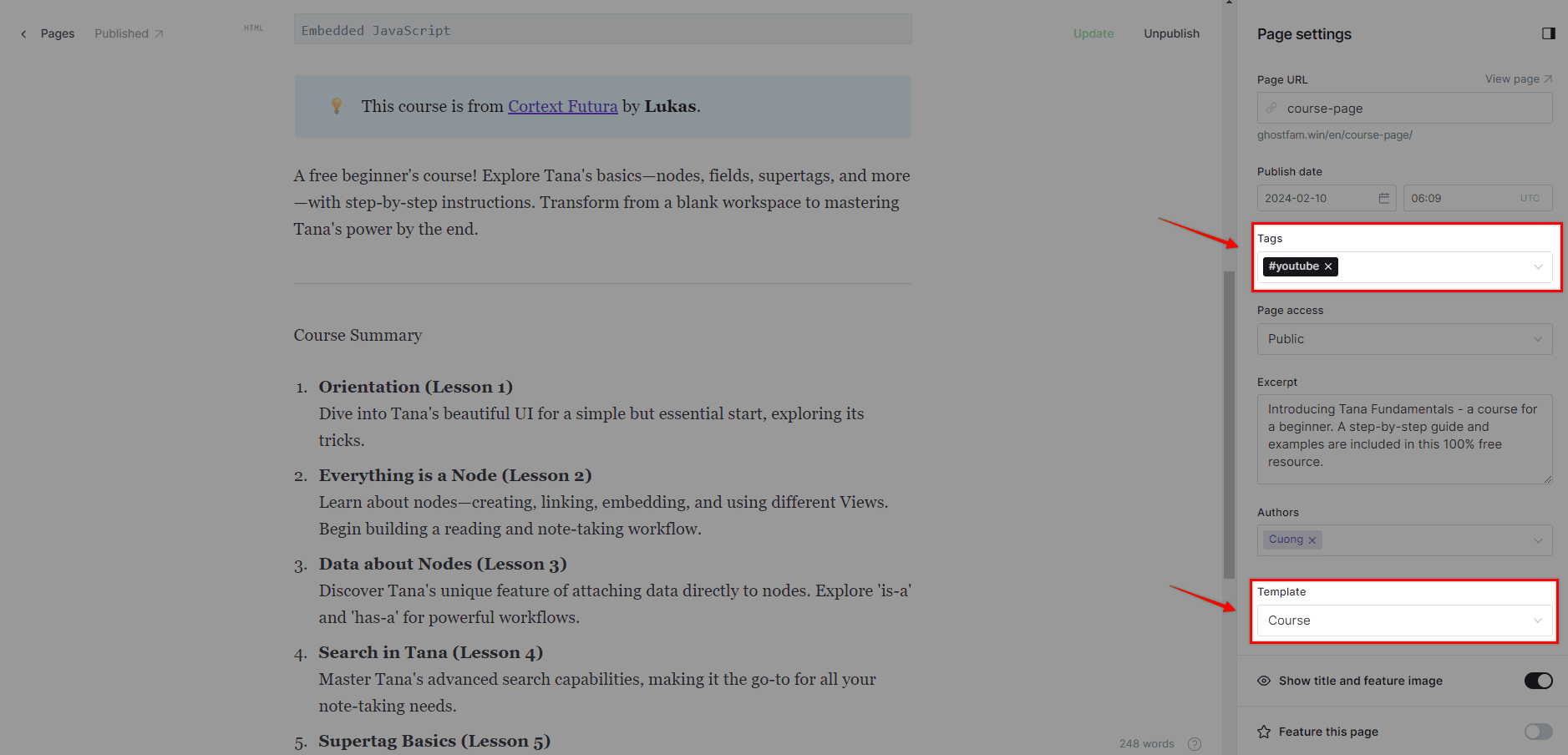
For example: Choose the Course template and my video source is Youtube
Step 2: Inject JS code and page content
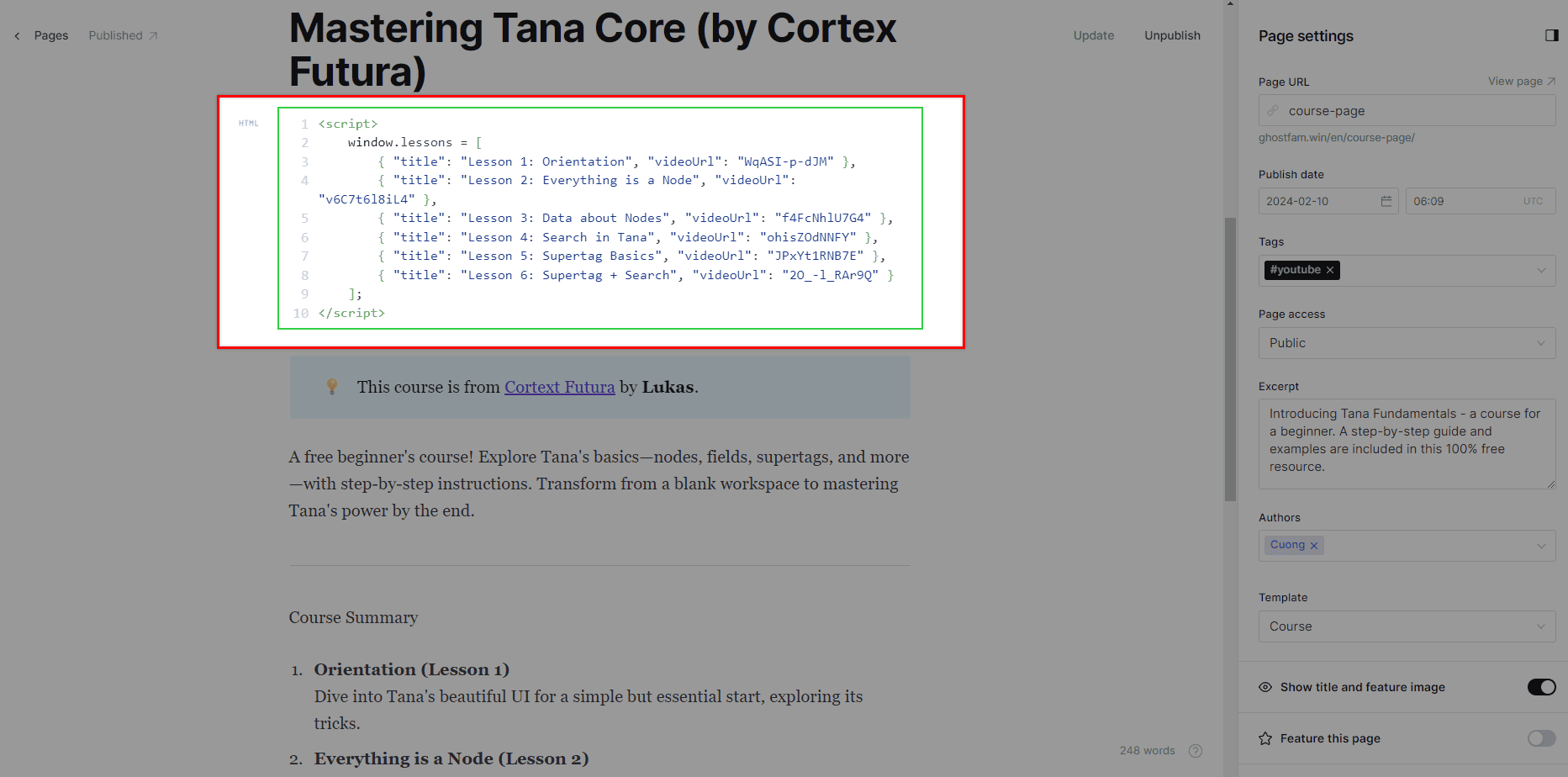
<script> window.lessons = [{ "title": "Lesson 1: Orientation", "videoUrl": "WqASI-p-dJM" }, { "title": "Lesson 2: Everything is a Node", "videoUrl": "v6C7t6l8iL4" }, { "title": "Lesson 3: Data about Nodes", "videoUrl": "f4FcNhlU7G4" }, { "title": "Lesson 4: Search in Tana", "videoUrl": "ohisZOdNNFY" }, { "title": "Lesson 5: Supertag Basics", "videoUrl": "JPxYt1RNB7E" }, { "title": "Lesson 6: Supertag + Search", "videoUrl": "2O_-l_RAr9Q" } ];</script>videoUrl = YouTube Video ID
To get the YouTube Video ID, you can look at the structure of the video’s URL. The Video ID is a unique string of characters (usually 11 characters) that identifies a specific video.
There are a few common YouTube URL formats, and the method for extracting the Video ID varies depending on the format:
1. Standard URL (watch?v=)
This is the most common format, typically seen when you’re watching a video on YouTube.
Structure:
https://www.youtube.com/watch?v=**VIDEO_ID**Example:
https://www.youtube.com/watch?v=8XoSspXg2iU&list=PLl5lrEYUPQvQYIVoDbTuRMV-DR4cwVhqS&index=1
Youtube Video ID: The string of characters immediately following v=.
In the example above, the Youtube Video ID is 8XoSspXg2iU.
2. Shortened URL (youtu.be/)
This is a shortened format, often shared on social media or via messages.
- Structure:
https://youtu.be/**VIDEO_ID** - Example:
https://youtu.be/dQw4w9WgXcQ
Youtube Video ID: The string of characters immediately following /.
In the example above, the Youtube Video ID is dQw4w9WgXcQ.
3. Embed URL (embed/)
This format is typically used when embedding videos into a website.
- Structure:
https://www.youtube.com/embed/**VIDEO_ID** - Example:
https://www.youtube.com/embed/FfJ4m75v0zU
Youtube Video ID: The string of characters immediately following /embed/.
In the example above, the Youtube Video ID is FfJ4m75v0zU.
Summary of How to Identify
- Look for
v=in the URL: The ID is the part after the=. - Look for
youtu.be/in the URL: The ID is the part after the/. - Look for
embed/in the URL: The ID is the part after/embed/.
The Youtube Video ID is always an 11-character string (letters, numbers, hyphens, or underscores).
<script> window.lessons = [{ "title": "Lesson 1: Orientation", "videoUrl": "90553795?h=1d774ad316" }, { "title": "Lesson 2: Everything is a Node", "videoUrl": "77895795?h=1d77fg5616" }, { "title": "Lesson 3: Data about Nodes", "videoUrl": "89505795?h=1d7748ig9" }, { "title": "Lesson 4: Search in Tana", "videoUrl": "8890795?h=2346ad396" }, { "title": "Lesson 5: Supertag Basics", "videoUrl": "67323795?h=345t4ad318" }, { "title": "Lesson 6: Supertag + Search", "videoUrl": "1243795?h=1d6u7d317" } ];</script>Vimeo
Vimeo videos are often private, requiring the addition of the parameter ?h=xxxxxxxx after the video ID, as shown in the code reference above.
<script> window.lessons = [{ "title": "1. Pro Video Hosting Bunny Stream", "videoUrl": "497120/99961679-0697-4ce0-b2bf-de0c4e58bbf8" }, { "title": "2. Unlocking Bunny Stream", "videoUrl": "497120/03fe26ab-7fbc-44b6-9f31-c04e2eaeee24" }, { "title": "3. Bunny Stream Hosting Tested", "videoUrl": "497120/5a215ff1-0134-45c6-bf36-fdbd8af018f7" }, { "title": "4. Bunny Stream vs Presto Player", "videoUrl": "497120/93b5ebcb-1244-4aab-aef1-329fbb361ebc" }, { "title": "5. Secure Videos with Bunny CDN", "videoUrl": "497120/15c4cafc-9b4e-470d-a125-2f9076367c74" }, { "title": "6. The Creator Dilemma", "videoUrl": "497120/63b97de8-90e2-4009-822b-8423af9b56b8" }]</script>Bunny
videoUrl = <Video Library ID>/<Video ID>. You can get <Video Library ID> at browser address, you can get <Video ID> at click on uploaded Videos.
For example, 497120/63b97de8-90e2-4009-822b-8423af9b56b8 with 497120 is <Video Library ID> and 63b97de8-90e2-4009-822b-8423af9b56b8 is <Video ID>.
Note: No / prefix the videoUrl.
In case you’re not familiar, Bunny is an affordable streaming video service with anti-download (DRM) features. It safeguards your videos from illegal downloading and even screen recording (need Enterprise plan).
<script> window.lessons = [{ "title": "1. Pro Video Hosting with Bunny Stream", "videoUrl": "https://filedn.com/lhV3z2cisrdF5Xh66hpsU4L/Pro_Video_Hosting__Bunny_Stream.mp4" }, { "title": "2. Getting Started with Bunny Stream", "videoUrl": "https://filedn.com/lhV3z2cisrdF5Xh66hpsU4L/Unlocking_Bunny_Stream.mp4" }, { "title": "3. Practical Look at Bunny Stream Hosting", "videoUrl": "https://filedn.com/lhV3z2cisrdF5Xh66hpsU4L/BunnyStream__Hosting_Tested.mp4" }, { "title": "4. Bunny Stream and Presto Player", "videoUrl": "https://filedn.com/lhV3z2cisrdF5Xh66hpsU4L/Pro_Video_Hosting__Bunny_Stream.mp4" }, { "title": "5. Safeguarding Your Videos with Bunny CDN", "videoUrl": "https://filedn.com/lhV3z2cisrdF5Xh66hpsU4L/Secure_Videos_with_Bunny_CDN.mp4" }, { "title": "6. The Content Creator's Challenge", "videoUrl": "https://filedn.com/lhV3z2cisrdF5Xh66hpsU4L/The_Creator_s_Dilemma.mp4" }]</script>HTML5 Video
You can add video sources with MP4 format from your any cloud storage like pCLoud, Cloudflare R2, Amazon S3, etc For example, I uploaded all my mp4 videos to Public folder of pCloud as demo to play. This is direct URL from Public folder: https://filedn.com/lhV3z2cisrdF5Xh66hpsU4L/Pro_Video_Hosting__Bunny_Stream.mp4
<script> window.lessons = [{ "title": "1. Machine Learning & AI", "videoUrl": "672295f0-0fc1-11f0-87c1-39ab68928003" }, { "title": "2. Ace the MAT Test", "videoUrl": "67c8da50-0fbc-11f0-b1a2-b1b61c56fbd3" }, { "title": "3. Common Uni Application Mistakes", "videoUrl": "770b5a90-0ece-11f0-bd7d-7b12a3d01666" }, { "title": "4. Get into St Andrews for Psychology", "videoUrl": "206736f0-1126-11f0-87c1-39ab68928003" }, { "title": "5. Get into Bocconi Masters in Finance", "videoUrl": "19abae50-105d-11f0-b1a2-b1b61c56fbd3" }, { "title": "6. Smash Your GCSE Exams", "videoUrl": "b16f5de0-1071-11f0-bd7d-7b12a3d01666" } ];</script>Alugha
Alugha is the free multilingual video platform like Youtube, but it will cost you for embed the videos on your own website. Please note.
<script> window.lessons = [{ "title": "1. Stream videos in five minutes", "videoUrl": "g11xsFT2MA9E92016CuQTSh8kv01aaUhJK" }, { "title": "2. Start live streaming", "videoUrl": "ynJku5M7FMPVGZpd2qkNnAMW00jgt1yQMmigr64QJ7hc" }, { "title": "3. Play your videos", "videoUrl": "01b2r4H6Pg8Q01NJZGppCu6X6tmfP6f6Jtp5oFZaETUwU" }, { "title": "4. Make API requests", "videoUrl": "EcHgOK9coz5K4rjSwOkoE7Y7O01201YMIC200RI6lNxnhs" }, { "title": "5. Make API requests with Postman", "videoUrl": "ub1CcCuqhGNuMuJ9fh3OdDD0001w7oQxDn38wjpdbbUP8" }, { "title": "6. Get thumbnails and images from a video", "videoUrl": "i2601kxZN02xxWWBzkGspI97yO4CjrlX4vunqqtiFsbOw" } ];</script>Note
videoUrl = Playback ID. Dont use Assets ID.
<script> window.lessons = [{ "title": "1. How to record your first video", "videoUrl": "2bff5385f32643ea9d065227ebfadd0d?sid=16130c54-a603-4176-87b8-3659e75b3a9f" }, { "title": "2. How to share your video", "videoUrl": "31f430c1a1e744b8a7b6c18a26982c71?sid=81b1e541-9355-4836-9f2f-d40bf4b831a3" }, { "title": "3. How to interact with a video", "videoUrl": "9be5bf7764a94315bd44f1b0747abf37?sid=8832cd0d-7679-4949-a17f-f144362aca89" }, { "title": "4. How to work async using Loom", "videoUrl": "d1d9c783701043eaa9b882e604daedcd?sid=481bfc92-95d0-44f3-bd99-23b518b21b65" }, { "title": "5. Deliver feedback with Loom", "videoUrl": "0dd0a01e10c742b28dbea75082c08635?sid=9c4c0065-a6ff-4783-a668-3b2e368614ad" }, { "title": "6. Explain an internal process", "videoUrl": "9e649b8c9bcf4b258401fa13d9334cb7?sid=1c839ec5-b84e-4864-8852-c5c6619cfe82" } ];</script>Note
You get videoUrl at share link of Loom after /share/ URL. Included parameter ?sid=.
For example, https://www.loom.com/share/xxxxxx?sid=31bc487a-4xxxxxx
To optimize SEO, ensure your page content includes long-form content. This should be presented as the Introduction section of your course page.
Dedicated course hub page
Have a dedicated course hub page is good. Check the tutorial of how to create a dedicated course hub page.
