Trang khoá học
Xem trang khoá học demo ⬇️
https://tanaflows.bepublish.com/youtube-course/
https://tanaflows.bepublish.com/bunny-course/
https://tanaflows.bepublish.com/html5-course/
https://tanaflows.bepublish.com/alugha-course/
https://tanaflows.bepublish.com/mux-course/
https://tanaflows.bepublish.com/loom-course/
Trong thời đại số, nhiều người thích học online để nâng cao kỹ năng. Trang khoá học chuyên biệt giúp bạn giới thiệu khoá học và thu hút học viên.
Trang khoá học còn giúp SEO tốt hơn và tăng chuyển đổi.
Các bước sau sẽ hướng dẫn bạn tạo trang khoá học tích hợp video từ YouTube, Vimeo, hoặc BunnyCDN.
Bước 1: Tạo trang khoá học
Tạo blog/trang mới (nên chọn dạng page) và dùng template Course.
Bạn cần chọn Course template và gắn tag chỉ nguồn video:
| Nền tảng | Thẻ (Tag) | |----------|-----| | Youtube | #youtube | | Vimeo | #vimeo | | Bunny | #bunny | | HTML5 | #htmlvideo | | Alugha | #alugha | | Mux | #mux | | Loom | #loom |
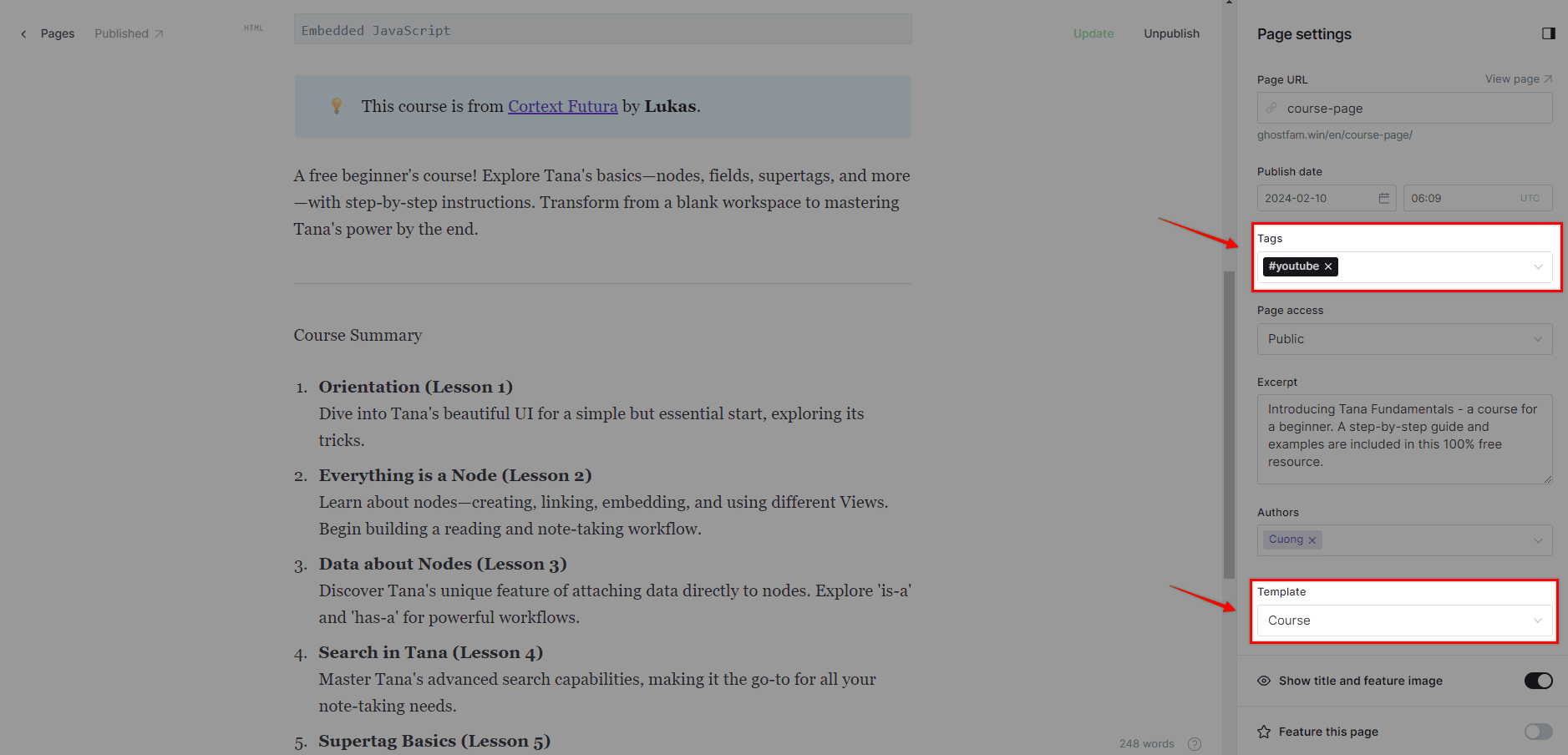
Ví dụ: Chọn Course template và nguồn video là Youtube
Bước 2: Thêm mã JS và nội dung trang
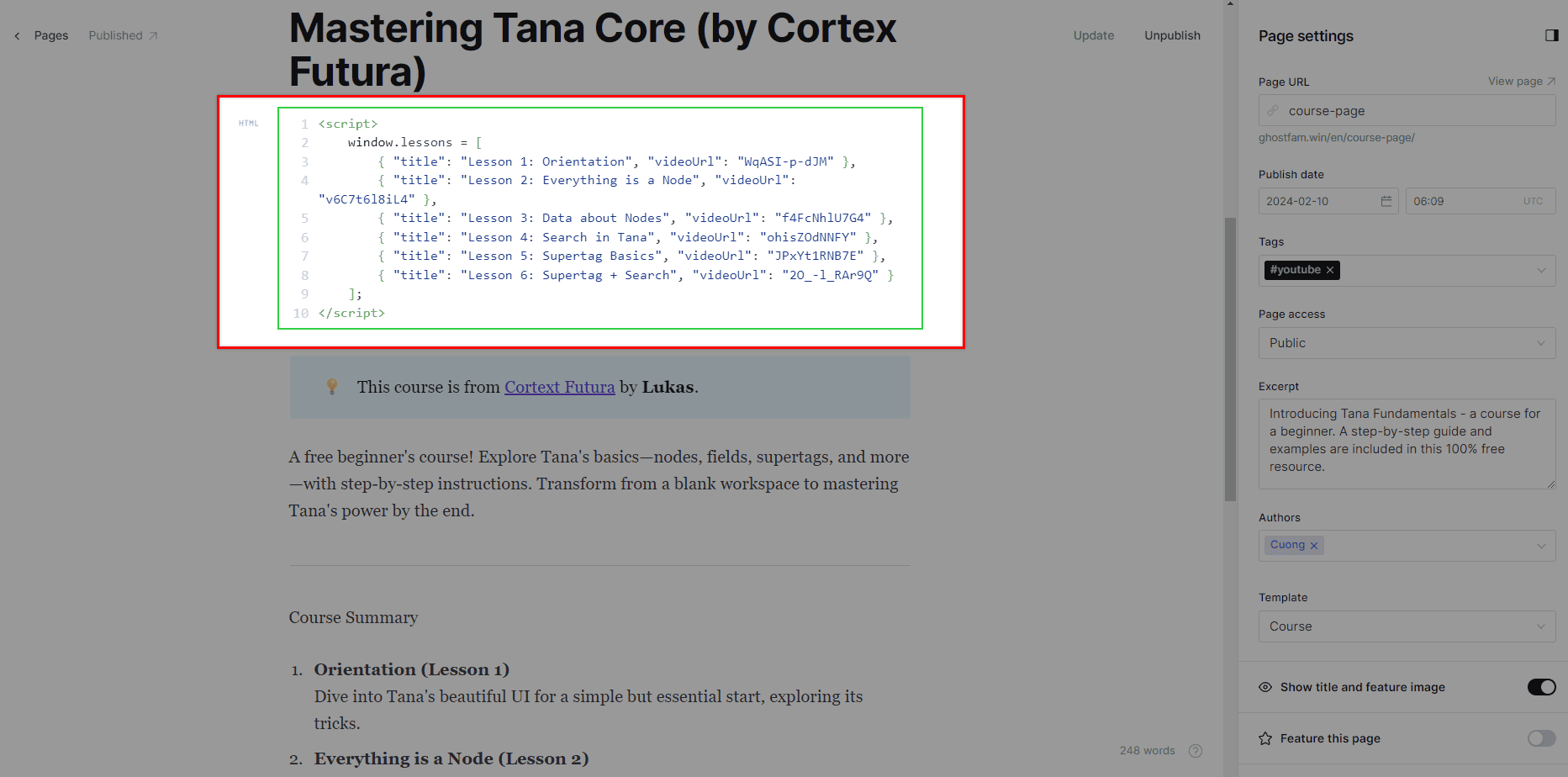
<script> window.lessons = [{ "title": "Lesson 1: Orientation", "videoUrl": "WqASI-p-dJM" }, { "title": "Lesson 2: Everything is a Node", "videoUrl": "v6C7t6l8iL4" }, { "title": "Lesson 3: Data about Nodes", "videoUrl": "f4FcNhlU7G4" }, { "title": "Lesson 4: Search in Tana", "videoUrl": "ohisZOdNNFY" }, { "title": "Lesson 5: Supertag Basics", "videoUrl": "JPxYt1RNB7E" }, { "title": "Lesson 6: Supertag + Search", "videoUrl": "2O_-l_RAr9Q" } ];</script>videoUrl = YouTube Video ID
Để lấy YouTube Video ID, bạn có thể nhìn vào cấu trúc URL của video. Video ID là một chuỗi ký tự duy nhất (thường là 11 ký tự) định danh cho một video cụ thể.
Có một vài định dạng URL YouTube phổ biến:
1. URL tiêu chuẩn (watch?v=)
- Cấu trúc:
https://www.youtube.com/watch?v=**VIDEO_ID** - Ví dụ:
https://www.youtube.com/watch?v=8XoSspXg2iU Youtube Video IDlà chuỗi ký tự ngay sauv=.
2. URL rút gọn (youtu.be/)
- Cấu trúc:
https://youtu.be/**VIDEO_ID** - Ví dụ:
https://youtu.be/dQw4w9WgXcQ Youtube Video IDlà chuỗi ký tự ngay sau/.
3. URL nhúng (embed/)
- Cấu trúc:
https://www.youtube.com/embed/**VIDEO_ID** - Ví dụ:
https://www.youtube.com/embed/FfJ4m75v0zU Youtube Video IDlà chuỗi ký tự ngay sau/embed/.
<script> window.lessons = [{ "title": "Lesson 1: Orientation", "videoUrl": "90553795?h=1d774ad316" }, { "title": "Lesson 2: Everything is a Node", "videoUrl": "77895795?h=1d77fg5616" }, { "title": "Lesson 3: Data about Nodes", "videoUrl": "89505795?h=1d7748ig9" }, { "title": "Lesson 4: Search in Tana", "videoUrl": "8890795?h=2346ad396" }, { "title": "Lesson 5: Supertag Basics", "videoUrl": "67323795?h=345t4ad318" }, { "title": "Lesson 6: Supertag + Search", "videoUrl": "1243795?h=1d6u7d317" } ];</script>Vimeo
Video Vimeo thường là riêng tư, yêu cầu thêm tham số ?h=xxxxxxxx sau video ID như ví dụ trên.
<script> window.lessons = [{ "title": "1. Pro Video Hosting Bunny Stream", "videoUrl": "497120/99961679-0697-4ce0-b2bf-de0c4e58bbf8" }, { "title": "2. Unlocking Bunny Stream", "videoUrl": "497120/03fe26ab-7fbc-44b6-9f31-c04e2eaeee24" }, { "title": "3. Bunny Stream Hosting Tested", "videoUrl": "497120/5a215ff1-0134-45c6-bf36-fdbd8af018f7" }, { "title": "4. Bunny Stream vs Presto Player", "videoUrl": "497120/93b5ebcb-1244-4aab-aef1-329fbb361ebc" }, { "title": "5. Secure Videos with Bunny CDN", "videoUrl": "497120/15c4cafc-9b4e-470d-a125-2f9076367c74" }, { "title": "6. The Creator Dilemma", "videoUrl": "497120/63b97de8-90e2-4009-822b-8423af9b56b8" }]</script>Bunny
videoUrl = <Video Library ID>/<Video ID>. Bạn có thể lấy các ID này trong bảng điều khiển Bunny. Ví dụ: 497120/63b97de8-90e2-4009-822b-8423af9b56b8.
<script> window.lessons = [{ "title": "1. Pro Video Hosting with Bunny Stream", "videoUrl": "https://filedn.com/lhV3z2cisrdF5Xh66hpsU4L/Pro_Video_Hosting__Bunny_Stream.mp4" }, { "title": "2. Getting Started with Bunny Stream", "videoUrl": "https://filedn.com/lhV3z2cisrdF5Xh66hpsU4L/Unlocking_Bunny_Stream.mp4" }];</script>HTML5 Video
Bạn có thể thêm nguồn video định dạng MP4 từ bất kỳ kho lưu trữ đám mây nào như pCLoud, Cloudflare R2, Amazon S3, v.v.
<script> window.lessons = [{ "title": "1. Machine Learning & AI", "videoUrl": "672295f0-0fc1-11f0-87c1-39ab68928003" } ];</script>Alugha
Alugha là nền tảng video đa ngôn ngữ miễn phí như Youtube.
<script> window.lessons = [{ "title": "1. Stream videos in five minutes", "videoUrl": "g11xsFT2MA9E92016CuQTSh8kv01aaUhJK" } ];</script>Lưu ý
videoUrl = Playback ID. Không dùng Assets ID.
<script> window.lessons = [{ "title": "1. How to record your first video", "videoUrl": "2bff5385f32643ea9d065227ebfadd0d?sid=16130c54-a603-4176-87b8-3659e75b3a9f" } ];</script>Lưu ý
Bạn lấy videoUrl tại liên kết chia sẻ của Loom sau phần /share/. Bao gồm cả tham số ?sid=.
Để tối ưu SEO, hãy bổ sung nội dung dài cho trang, nên đặt ở phần Giới thiệu khoá học.
Trang hub khoá học chuyên biệt
Nên có trang hub khoá học riêng. Xem hướng dẫn tạo trang hub khoá học.
https://tanaflows.bepublish.com/courses/